

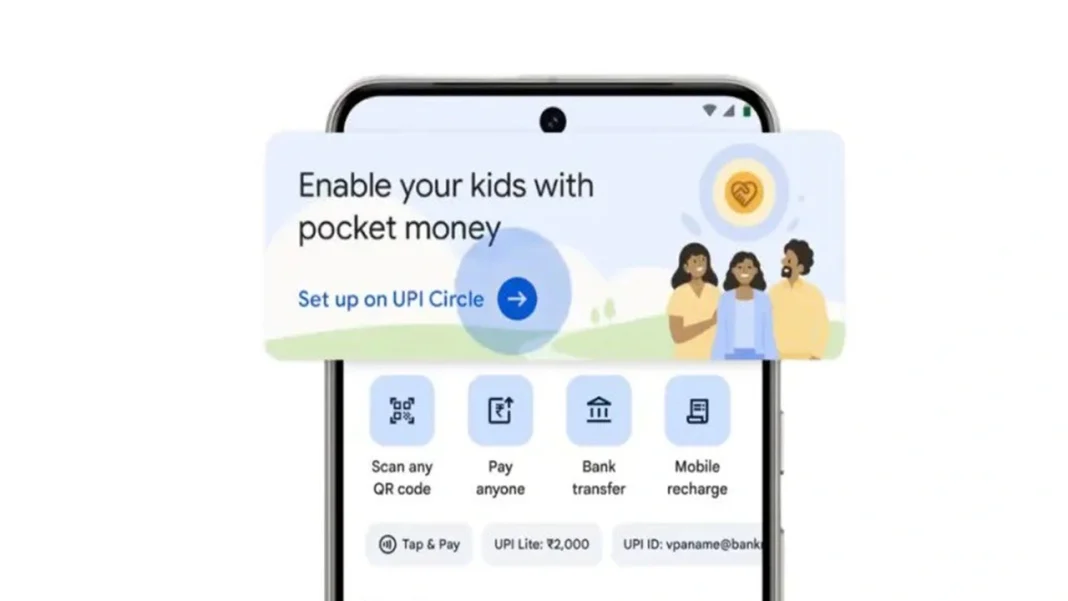

Google Pay’s Pocket Money feature is built on UPI Circle and is meant for supervised family payments. It lets one person pay from their bank account for a trusted secondary user, so children, teens, or even other family members can make digital payments without needing their own bank account. Google says the feature supports two modes: a monthly spending limit of up to ₹15,000, or an approval-first setup where every payment request must be cleared by the primary user. Parents also get instant transaction alerts and can track spending inside the app.
What Pocket Money In GPay Actually Does
Pocket Money works through UPI Circle. The primary user links a secondary user and allows them to make payments using the primary user’s bank account. Google Pay’s help page says you can add up to five secondary users, provided they are saved in your contacts, registered on Google Pay, and have a UPI ID or UPI Circle QR. This makes it useful for pocket money, family errands, or controlled payments for students living away from home.
Google formally rolled out Pocket Money in India in December 2025, positioning it as a way to help younger users build financial confidence with supervision built in. Google India also promoted the feature on its official X account, which helped push it into trending fintech conversations around family spending and teen payments.
How To Set It Up On Google Pay
On Google Pay, go to your profile, open UPI Circle, and choose “Set up pocket money on UPI Circle.” Then search for the secondary user, select the contact, scan their UPI Circle QR, and choose how payments should work. If you select approval mode, the invite goes out directly. If you select a monthly limit, Google Pay asks for relationship details, ID information, the bank account to be used, and your UPI PIN to complete setup.
There is also a cooling-off rule. After a secondary user is added, they can only request up to ₹5,000 in the first 24 hours. After that, the primary user’s normal UPI limits apply.
Approval Mode Vs Monthly Limit
This is the most important choice. In full delegation, you set a monthly cap, up to ₹15,000, and the secondary user can pay within that range without asking every time. In partial delegation, each payment needs approval from the primary user. The request must be accepted within 10 minutes, which makes this mode better for tighter control.
Where Spending Control Really Helps
For many families, approval mode is the safer starting point. It gives children a way to learn digital payments, but keeps the adult in charge. Once spending habits look stable, some families may move to a monthly cap for small daily payments like snacks, stationery, or travel. That is why this feature is getting attention: it feels less like a free wallet and more like guided access. This is an inference based on how Google designed the two control modes and transaction alerts.
Stay Ahead in the Digital Payments Revolution
When Will India Post Bank Go Public?
Explore the 2026 IPO plan and stake divestment strategy details.
How UAE Leads Digital Payment Innovation?
Discover how cross-boundary connectivity is transforming payments across the region.
Why Google Pay Adds Convenience Fees?
Check the reasons behind new charges on bill payments and user impact.
How Digital Payments Changing Asia Spending?
Explore how UPI, GCash, and WeChat Pay are reshaping transactions.
How UPI Driving India Cashless Economy?
Discover how UPI is accelerating India’s shift toward a cashless future.
What You Can Pay For And What Still Does Not Work
Google Pay says Pocket Money currently supports QR payments, phone numbers, contacts, UPI IDs, and online payments. Bill payments, recharges, and UPI Lite are not supported yet, though some of these may be added later. If you want a clean use case today, think of merchant payments first.
An official Google India post on X and Google’s recent YouTube campaign have helped make Pocket Money more visible, but the real value is simple: supervised payments without handing over full banking access.
FAQs
Is Pocket Money on GPay only for kids?
No, Google Pay allows family, friends, or employees as secondary users under UPI Circle too.
What is the maximum monthly limit available?
Google Pay allows a monthly spending limit of up to ₹15,000 for secondary users.
Does every transaction need approval?
Only in approval mode. Monthly limit mode allows payments without approval within the set cap.
Can Pocket Money be used for recharges?
No, recharges and bill payments are not currently supported under Pocket Money on UPI Circle.
Can one person join multiple UPI Circles?
No, a secondary user can only be part of one UPI Circle at once.